This is default featured slide 1 title

Go to Blogger edit html and find these sentences.Now replace these sentences with your own descriptions.

This is default featured slide 2 title

Go to Blogger edit html and find these sentences.Now replace these sentences with your own descriptions.

This is default featured slide 3 title

Go to Blogger edit html and find these sentences.Now replace these sentences with your own descriptions.

This is default featured slide 4 title

Go to Blogger edit html and find these sentences.Now replace these sentences with your own descriptions.

This is default featured slide 5 title

Go to Blogger edit html and find these sentences.Now replace these sentences with your own descriptions.

Showing posts with label 100. Show all posts

Tuesday, 27 September 2016

How To Increase Utorrent Download Speed 100 Working

How To Increase Utorrent Download Speed 100 Working


 Now you are ready for increase torrent Download speed

You can apply these Setting to uTorrent and BitTorrent.Most poeple use uTorrent thats why i choose uTorrent For this Tutorial to show how to change settings.But you can apply same settings to BitTorrent. Ok lets Start!!
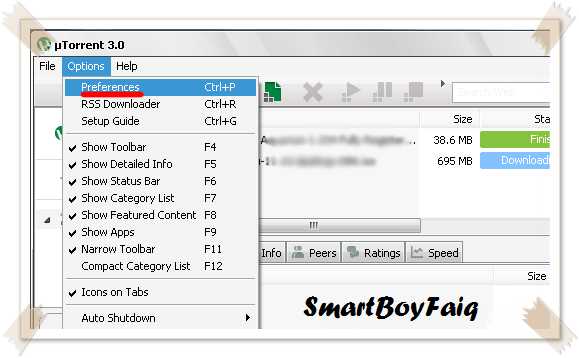
Click on "Option"
Go to "Preferences"


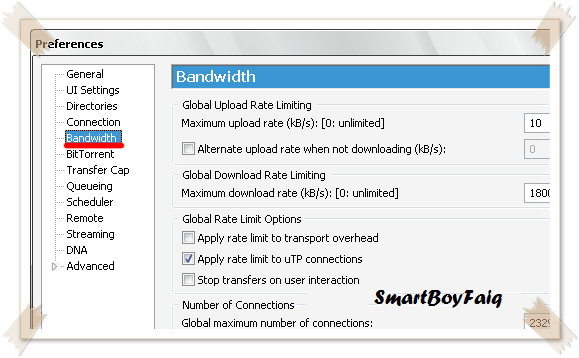
  • Click on "Bandwidth"

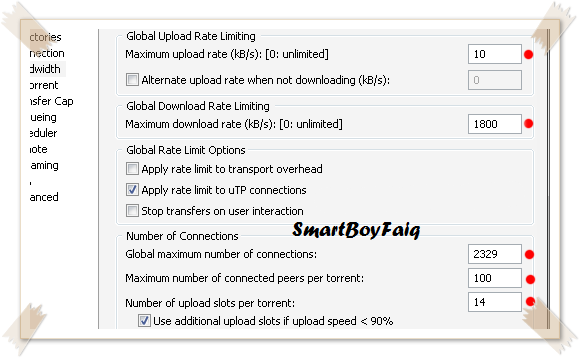
  •  Set
    Maximum Upload Rate : ------------------------------- [ 10 ]  or  [ 15 ]
    Maximum Download Rate : ---------------------------- [ 1800  ]
    Global maximum number of connections : ------------- [ 2329 ]
    Maximum number of connected pees per torrent : ---- [ 100 ] or not more than [ 300 ]
    Maximum upload slots per torrent : -------------------- [ 14 ]                         
  • Leave rest Default


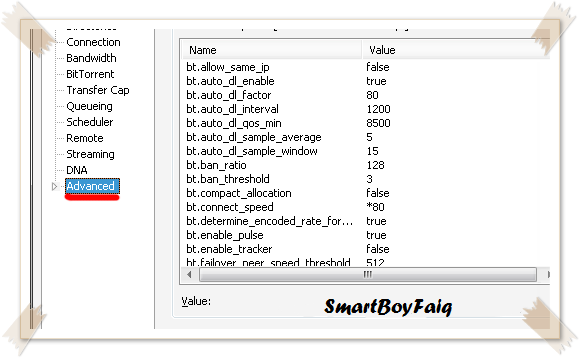
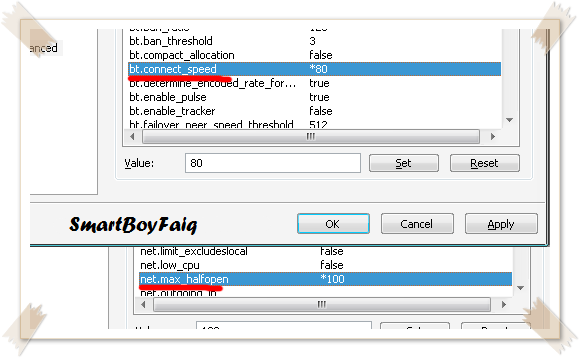
  • Click on "Advanced"


  • Look for "bt.connect_speed" Set it to "80"
  •  Look for "net.max_halfopen" Set it to "100"
    Now All DoNE!! Click on "Apply"
    Exit the uTorrent Application and re Run it.......Feel the new speed
    (Check out the screen shot below)


Before i use this trick my download speed was 200-250kbps


download now

Monday, 26 September 2016

How to Root LeEco Le 1S 100 Working

How to Root LeEco Le 1S 100 Working


Hello Friends Now You I Explain To You How To Root LeEco Le 1S Without Any Problem........

LeTV or LeEco is the new name in the smartphone world and they have already kicked the smartphone market by launching budget killer phone LeEco Le 1S (Le X507). At this price range, this is really good looking with nice build material awesome phone. LeEco Le 1S runs on 2.2 Ghz Octa core Helio X10 Turbo MTK processor with 3GB RAM. No doubt this a budget killer phone. So if you have this killer phone and you want to root LeEco Le 1S device then you can follow this post.

Rooting android device gives you an extra hand to control your device but on the other hand, you lose warranty and sometimes OTA updates. But if you are that type power user and want to explore more then rooting is nice, you just need to know why you are rooting your device and what are the pros and cons of rooting Android device.

Now let’s root LeEco Le 1S Model number Le X507. Rooting this device is quite easy as apart from other Android devices. Here is the step by step method to root LeEco Le 1S, just follow the steps carefully.
Warning: All rooting should be the responsibility of the user and we at Cyber Key are only informing you of the method to do it after testing it ourselves. However, we don’t claim responsibility should things not go as described in this article. For a deeper understanding, check out our post on pros and cons of rooting an Android device.

How to Root LeEco Le 1S [100% Working]

Note: Before rooting make a backup of your data and contacts etc.
  1. Download KingRoot app on your LeEco Le 1S ( This app not available in Play Store)
  2. Install the APK file ( Make sure have unknown sources enables in settings)
  3. Connect your phone to internet vis mobile data or Wifi
  4. Now run the KingRoot app
  5. Click “try it” to enter the main interface


 Then click “get now” button to start rooting


  1. This app will start rooting your device automatically and it will take some time.
  2. Once the process is 100% complete, it means your LeEco Le 1S is rooted successfully.
  3. Now use root checker to verify it.
In the mean time of rooting LeEco Le 1S, KingRoot installs a third party app name Purify. You can uninstall it if you don’t like it. Another thing is you don’t need SuperSU as KingRoot itself works as SuperSu. So root your LeEco Le 1S using KingRoot and enjoy the super user power.


download now

Adobe After Effect CC Crack! 100 Gratis Download

Adobe After Effect CC Crack! 100 Gratis Download


Adobe After Effect CC Crack
Adobe After Effect CC Crack! 100% Gratis Download - merupakan software yang digunakan untuk para graphic atau designer film untuk membuat video lebih keren atau dramatis.Adobe After Effects CC  juga mempunya GUI . Adobe After Effects CC  juga telah menggunakan engine terbaru sehingga proses pengerjaan efek dan performanya lebih baik dari versi sebelumnya


FUNGSI ADOBE AFTER EFFECT 

seperti penjelasan saya di atas fungsi adobe after effect adalah untuk membuat film atau video menjadi lebih menarik. dengan efek 3D pada adobe membuat video seperti hidup.

Adobe After Effect CC Crack

Adobe After Effect CC Crack

System requirement

Untuk Windows

  • Intel Core2 Duo or AMD Phenom II processor with 64-bit support
  • Microsoft Windows 7 with Service Pack 1, Windows 8, or Windows 8.1
  • 4 GB of RAM (8 GB recommended)
  • 5 GB of available hard-disk space; additional free space required during installation (cannot install on removable flash storage devices)
  • Additional disk space for disk cache (10 GB recommended)
  • 1280 x 1080 display
  • OpenGL 2.0–capable system
  • QuickTime 7.6.6 software required for QuickTime features
  • Optional: Adobe-certifi ed GPU card for GPU-accelerated ray-traced 3D renderer
  • Internet connection and registration are necessary for required software activation, validation of subscriptions, and access to online services.*

Untuk Mac OS

  • Multicore Intel processor with 64-bit support
  • Mac OS X v10.8, v10.9 or v10.10
  • 4 GB of RAM (8 GB recommended)
  • 5 GB of available hard-disk space for installation; additional free space required during installation (cannot install on a volume that uses a case-sensitive fi le system or on removable flash storage devices)
  • Additional disk space for disk cache (10 GB recommended)
  • 1440 x 900 display
  • OpenGL 2.0–capable system
  • QuickTime 7.6.6 software required for QuickTime features
  • Optional: Adobe-certified GPU card for GPU-accelerated ray-traced 3D renderer
  • Internet connection and registration are necessary for required software activation, validation of subscriptions, and access to online services.*

Link Download
  • Single link (64 bit)


download now